What Are Copy Paste Fonts and Why Do Free Fire Players Love Them?

Copy paste fonts are special text styles that use Unicode characters to create fancy, decorative versions of ordinary letters. You can copy them and paste them directly into your Free Fire name without any technical hassle. The appeal is simple: in a game where millions of players compete for attention, a unique name helps you stand out in the lobby, on the leaderboard, and during matches. It's a way to express your personality, whether you want something edgy, cute, or just plain intimidating. You don't need to download software or learn coding. Just find a style you like, copy it, and paste it into the name change field. This ease of use has made copy paste fonts a staple in the Free Fire community, and even casual players get hooked on customizing their names with stylish text. Beyond aesthetics, these fonts can make your name harder to replicate, giving you a sense of ownership over your in-game identity. The ability to transform a plain name into something eye-catching is a small but powerful way to enhance your gaming experience.
Key Takeaways
- Copy paste fonts use Unicode characters to style your Free Fire name instantly, no downloads needed.
- Stick to common Unicode ranges like mathematical alphanumerics to avoid blank boxes in-game.
- Combine fonts with symbols from our symbols page for a unique look, but keep it readable.
- Always test your new name in a practice lobby before spending a Name Change Card.
- Free Fire supports these fonts on all platforms, and they don't affect gameplay or account standing.
How Copy Paste Fonts Work: Unicode and the Art of Fancy Text
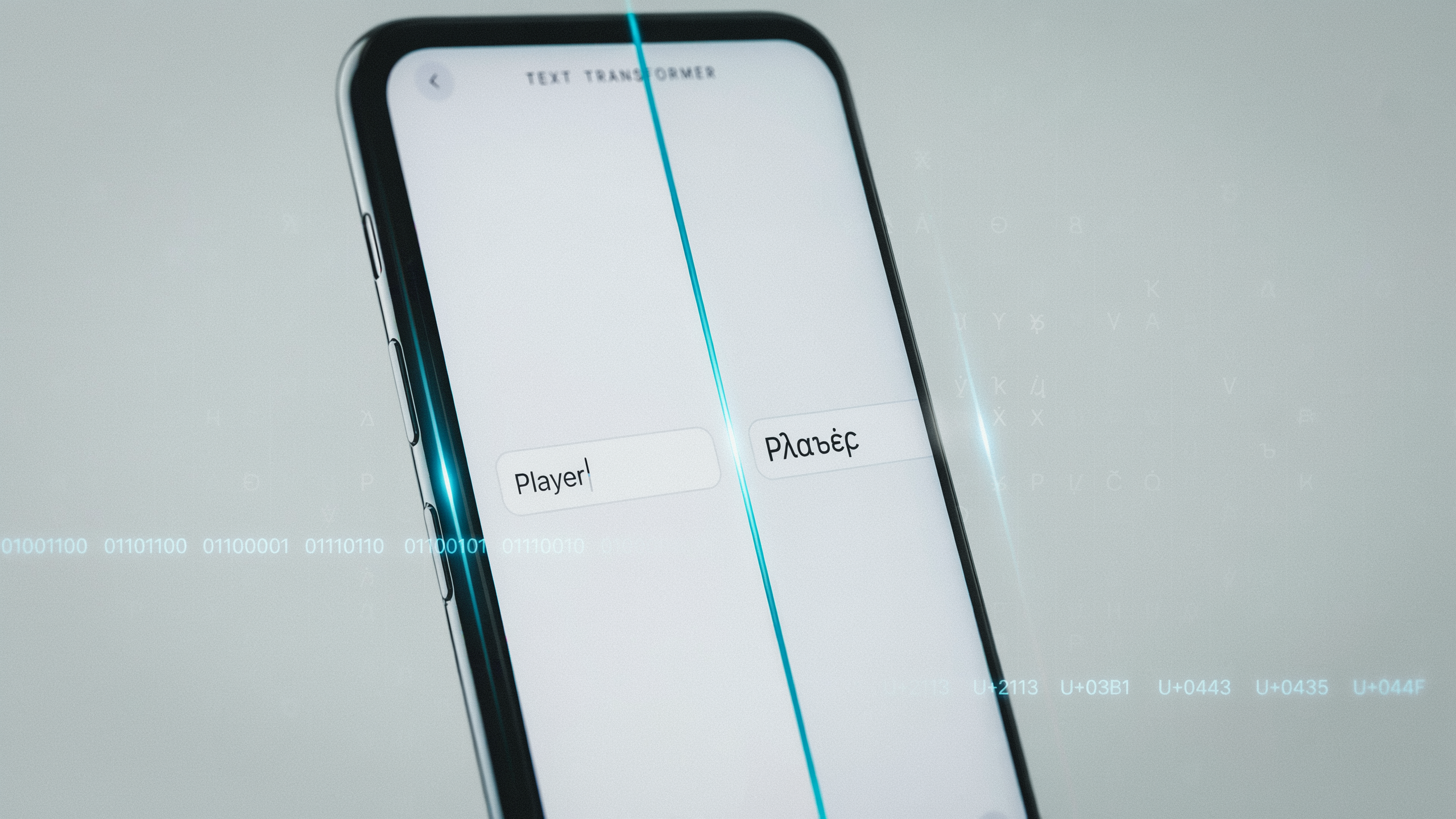
When you first start customizing your Free Fire name, you might think you're picking a new font from a list. But the truth is way more interesting: these aren't actual fonts at all. What we call copy paste fonts are really Unicode characters that look like stylized alphabets but come from various scripts around the world. For example, the letter "a" in a fancy style might actually be a mathematical symbol or a character from the Cyrillic alphabet. The system just displays it as a different shape, so it looks like a new font to us.
This is why you can paste these fancy fonts into almost any app: the Unicode standard is built into every modern device. On Android, iOS, or PC, the characters render the same way. That's the magic behind a free fire pro name copy tool: it maps each plain letter to a visually similar Unicode symbol, creating the illusion of a custom font without installing anything. The best ones let you preview the text instantly before you copy it.
One thing to keep in mind: not all Unicode symbols are supported in Free Fire. The game's text field has its own filter, so some characters might show up as blank boxes or get rejected entirely. That's why it's smart to stick to the most common ranges, like mathematical alphanumerics and enclosed alphanumerics. These are the safest bets for a clean, readable name that still stands out. If you're curious about the technical side, the Unicode Consortium maintains the official character database (Unicode Consortium), but for daily use, a reliable font changer handles all the heavy lifting.
Getting Started: Using a Font Changer for Your Free Fire Name
The first time you want a stylish Free Fire name, you'll type your plain name into a font changer tool and suddenly have dozens of fancy options, all ready to copy and paste. It feels like unlocking a secret level of personalization. The process is so simple that even if you're not tech-savvy, you can have a unique name in under a minute. Here's how to do it every time you want a fresh look.
First, open a reliable font changer site like free fire pro name copy on your phone or PC. You'll see a text box front and center. Type your current Free Fire name or any word you want to transform. For example, start with "Joker" or "Phoenix" because those are popular base names in many squads. As soon as you type, the tool instantly generates a list of stylish text variations below the box. You'll see cursive, bold, gothic, glitch, and even bubble-style fonts, all rendered in real time.
Now comes the fun part: browsing the styles. Scroll through the generated list and tap any style that catches your eye. The tool automatically copies it to your clipboard. Try out five or six styles before picking one that matches your mood. Some fonts look better with symbols added later, but for now, just focus on the letters. The beauty of these copy paste fonts is that you don't need to install anything or memorize codes. The tool handles the Unicode conversion behind the scenes, so the text works in Free Fire and most other apps.
Once you've copied your chosen style, head over to Free Fire and paste it into the name change field. Always preview it in the game lobby to make sure it displays correctly. If it looks good, confirm the change and you're done. The whole process takes less than a minute, and you can repeat it whenever you want a new identity. Changing your name dozens of times using this method never gets old.
Top 10 Stylish Text Styles for Free Fire Names in 2026
When you scroll through Free Fire lobbies in 2026, you see names that look nothing like plain text. That's the power of Unicode stylish text styles. These aren't fonts you install; they're character sets that every device can read. Dozens of fancy fonts have been tested and narrowed down to ten styles that really make a name stand out. Each one works with any free fire pro name copy tool that supports Unicode conversion.
1. Bold Serif uses mathematical bold symbols like 𝐁𝐨𝐥𝐝. It gives a heavy, confident look. It's recommended for aggressive players who want their name to feel unstoppable. Example: 𝐃𝐞𝐚𝐝𝐬𝐡𝐨𝐭 becomes a statement.
2. Bold Sans (𝗕𝗼𝗹𝗱) is cleaner and more modern. It reads well on small screens, so it's used for clan tags where clarity matters. Example: 𝗦𝗵𝗮𝗱𝗼𝘄𝗙𝗹𝗮𝗺𝗲.
3. Italic Serif (𝑰𝒕𝒂𝒍𝒊𝒄) adds a slant that suggests speed. It pairs well with sniper-themed names because the tilt mimics motion. Example: 𝑸𝒖𝒊𝒄𝒌𝒔𝒄𝒐𝒑𝒆.
4. Cursive Script (𝒞𝓊𝓇𝓈𝒾𝓋𝑒) looks handwritten and elegant. It's perfect for players who want a graceful vibe. Many female gamers choose this for names like 𝒫𝓇𝒾𝓃𝒸𝑒𝓈𝓈.
5. Gothic Fraktur (𝕲𝖔𝖙𝖍𝖎𝖈) has a medieval, dark aesthetic. It's great for horror-themed names or Halloween events. Example: 𝕯𝖆𝖗𝖐𝕶𝖓𝖎𝖌𝖍𝖙.
6. Double-Struck (𝔻𝕠𝕦𝕓𝕝𝕖) looks like chalkboard letters. It stands out because few players use it. It's suggested for math-inspired names like 𝔽𝕦𝕟𝕔𝕥𝕚𝕠𝕟.
7. Bubble (ⓑⓤⓑⓑⓛⓔ) encircles each letter. It's playful and great for casual players. Use it for funny names like Ⓛⓞⓞⓣⓜⓐⓢⓣⓔⓡ.
8. Upside-Down flips characters (uʍop ǝpᴉsdn). It's a conversation starter. It's recommended for trickster players who enjoy confusing opponents. Example: ɹǝʇsɐɯǝɯɐƃ.
9. Small Caps (Sᴍᴀʟʟ Cᴀᴘs) uses petite uppercase letters. It looks neat and professional. It's often seen in competitive squad names like Tᴇᴀᴍ Aᴄᴇ.
10. Monospace (𝙼𝚘𝚗𝚘) mimics typewriter text. It has a retro, hacker feel. Use it for tech-themed names like 𝙲𝚘𝚍𝚎𝙱𝚛𝚎𝚊𝚔𝚎𝚛.
Mixing these fancy fonts is where the real fun begins. Often, bold is combined for the main name and a cursive tag for flair. Just remember that not every style supports all characters, so test your name before committing. With these ten stylish text options, your Free Fire name will never look ordinary again.
Combining Copy Paste Symbols with Fonts for Unique Names
Once you've picked a font style for your Free Fire name, the next step is to make it truly stand out by adding symbols. A name like "SniperKing" looks decent, but "★彡SniperKing彡★" grabs attention the moment you enter the lobby. The trick is to use copy paste symbols that frame your name without making it unreadable. Stars, crowns, hearts, arrows, and even small wing dingbats can turn a plain text name into something that looks like a pro player's tag. The key is balance: too many symbols clutter the screen, while just one or two on each side create a clean, symmetrical look that other players will want to copy.
Hours of experimenting have shown that certain symbols work better with specific font styles. For example, a bold italic font paired with a simple star symbol on each side gives a sleek, competitive vibe. If you're going for a more royal or elite feel, a crown symbol before your name with a fancy script font does the job. You can grab these symbols from our symbols page, which has a huge collection ready to use. Just tap the symbol you like, and it copies to your clipboard instantly. Then paste it into the Free Fire name change box along with your styled text.
Here are a few combinations that work really well in 2026:
- Aggressive style: 「✪」J O K E R「✪」 using a spaced-out font.
- Cute style: ♡・゚CandyQueen゚・♡ with a soft, rounded font.
- Mystic style: ꧁༒☬Shadow☬༒꧂ using a gothic font.
Remember, not every symbol displays correctly in Free Fire. Some older devices or regional versions might show a blank box instead of the symbol you chose. Always test a new name in the training ground first to make sure it renders properly. Also, avoid using too many complex symbols in a row because they can break the text alignment in the kill feed. A good rule of thumb is to use no more than three symbols on each side of your name. This keeps it looking clean while still giving that custom, stylish text effect that makes your profile memorable.
Step-by-Step: How to Change Your Free Fire Name with Copy Paste Fonts
Once you've found the perfect free fire pro name copy style, the actual in-game process is quick. First, open Free Fire on your device and tap your profile picture in the top-left corner of the main lobby screen. This takes you to your profile page, where you'll see your current nickname displayed near the top. Look for the small edit icon (usually a pencil or a notebook symbol) next to your name and tap it. A text field will appear, allowing you to delete the old name and paste your new one.
Before you paste, make sure you've already copied the stylish text from your font changer tool. If you're on mobile, long-press the text field and select "Paste" from the pop-up menu. On a PC emulator, you can use Ctrl+V. The game will show a live preview, so you can double-check that all the fancy characters and symbol elements look exactly as you intended. Pay close attention to any symbols that might not render correctly in the game's font.
After pasting, tap the "Change" or "Confirm" button. Free Fire requires a Name Change Card for this action. If you don't have one, the game will prompt you to purchase it with diamonds (usually 390 diamonds) or use a card from your inventory. Name Change Cards are sometimes given out during events, so check your vault before spending diamonds. Keep in mind that Free Fire has a 12-character limit for names, and some Unicode symbols count as more than one character. If your pasted name exceeds the limit, the game will trim it automatically, which might break your design. It's recommended to test the name in a notepad app first to see the character count.
Once confirmed, your new name will appear immediately in your profile and in matches. If you want to experiment further, you can use a font keren ff copy paste tool to try different styles before committing another Name Change Card. Remember, you can change your name once every few days, so pick a style you'll enjoy for a while.
Copy Paste Fonts for Regional Languages: Hindi and Indonesian Examples
When first experimenting with copy paste fonts for a Free Fire name, it's easy to assume they only work with English letters. That changes quickly when you see a squadmate with a stylish Hindi name that uses bold and cursive characters. The same Unicode magic that transforms "A" into "𝓐" also works for many scripts, including Devanagari and Latin-based Indonesian alphabets. The key is understanding which Unicode blocks your chosen font changer supports, because not every fancy style covers every regional character.
For Hindi names, the process is straightforward: type your desired name in Devanagari script into a font generator, and it will convert the characters into mathematical bold, italic, or script styles if those blocks include the necessary glyphs. Names like "राजा" can be created in a sleek serif style that stands out in the lobby. Our naam copy karne wala tool is built specifically for this, letting you paste your Hindi text and instantly see multiple fancy versions. Just remember that some older phones may not render these glyphs correctly, so always test your name in a custom room before committing to a name change card.
Indonesian players have an advantage because their language uses the same basic Latin alphabet as English, which means every copy paste fonts style works perfectly. You can take a name like "Petarung" and turn it into "𝓟𝓮𝓽𝓪𝓻𝓾𝓷𝓰" or "𝐏𝐞𝐭𝐚𝐫𝐮𝐧𝐠" without any missing characters. The font keren ff copy paste page is often browsed for inspiration when you want a name that feels both local and stylish. The trick is to avoid mixing scripts that clash visually; a Javanese-inspired name in a clean sans-serif font can look incredibly sharp next to your guild tag.
Common Mistakes to Avoid When Using Fancy Fonts in Free Fire
Countless players get excited about free fire pro name copy tools only to run into frustrating roadblocks. The biggest mistake is using unsupported characters that look great in a preview but turn into blank boxes in the game. Free Fire's text engine only recognizes a specific subset of Unicode symbols, so that fancy cursive "a" you found might render as a question mark on your opponent's screen. Always test a new name in a practice lobby before committing the 390 diamond name-change card.
Another common pitfall is making the name too long. The game has a strict character limit, and many symbol combinations add invisible width. A name with three star symbols and a bold font once got cut off mid-letter. Now every character is counted, including spaces and symbols, and the total is kept under 12 to be safe. Overcomplication is the enemy of style: stacking five different fonts and ten symbols results in an illegible mess that nobody can read. A clean, readable name with one or two fancy fonts stands out far more than a cluttered one.
Illegible styles are a trap, especially with heavily stylized fonts that distort letters beyond recognition. This was learned the hard way when squadmates kept calling out the wrong name because a "gothic" font made an "e" look like a "c". Before finalizing any name, send a screenshot to a friend and ask them to read it back. If they hesitate, simplify. Finally, avoid fonts that rely on regional scripts unless you're sure your device supports them; font keren ff copy paste styles can work on one phone and fail on another. A quick test on a secondary device saves you from looking like a noob with a broken name.
How to Create Your Own Unique Stylish Text Combinations
When first starting Free Fire, it's common to think picking a cool name means just slapping some random symbols around your IGN. But after months of experimenting, it's clear that the best names come from a thoughtful mix of fonts, spacing, and special characters. The key is to treat your name like a tiny piece of art. Start with a base word that represents your playstyle or personality, then layer on stylish text elements one at a time. For example, begin with "Shadow" and then run it through a font changer to get something like 𝕊𝕙𝕒𝕕𝕠𝕨. But that alone is too plain, so add a star symbol at the front and back: ★𝕊𝕙𝕒𝕕𝕠𝕨★. Still not unique enough? Insert a tiny space or a dot between each letter: ★ 𝕊 𝕙 𝕒 𝕕 𝕠 𝕨 ★. That spacing trick is huge because it makes the name readable even with fancy fonts.
Here's a simple mini-tutorial to follow when building a new name. First, pick your core word, something short and punchy like "Blaze" or "Queen". Next, choose a font style from a reliable tool like free fire pro name copy that gives you a preview of the text. Test three or four styles before settling on one. Then, browse a symbols collection, like the one at our symbols page, to find matching icons. A crown for royalty, a flame for aggression, or a cross for a clan tag. Place one symbol on each side of the name for symmetry, or stack them vertically if the game allows. Finally, adjust the spacing by adding invisible characters or thin spaces between letters. This step is crucial because some fonts become unreadable when letters are too close. Always test the name in a chat preview to make sure it looks good on both mobile screens and in-game lobbies. Remember, the goal is to stand out while keeping your name easy to recognize. With a bit of practice, you'll develop your own signature style that no one else can copy.
The Best Free Fire Name Styles for 2026: Trends and Inspiration
Free Fire name trends shift every season, and 2026 is all about personality. Testing copy paste fonts on various accounts and watching what top players and streamers use reveals a few clear styles dominating right now. Minimalistic names with clean, thin Unicode letters are huge because they look sharp on the kill feed. Think simple words like "Ace" or "Void" wrapped in a sleek font that stands out without clutter. Glitch-style text is also everywhere this year, using zalgo or stacked diacritics to make names look broken or corrupted in a cool way. Players pair a glitch font with a dark, edgy word like "Phantom" or "Error" and it instantly gets noticed in lobbies.
Aesthetic and themed names are another big trend. Soft, rounded fonts combined with floral or heart symbols create a cute vibe that's popular among duo and squad players. For example, a name like "Luna" in a bubbly font with a moon symbol feels complete. On the other hand, aggressive players lean into bold, spiky fonts with fire or skull symbols. There's also a rise in regional pride, where players use fonts that support Hindi or Indonesian scripts to spell their name in their own language, then add a stylish twist. If you're looking for ready-made inspiration, our ff name style copy paste collection has dozens of trending combinations you can grab in seconds.
When building a name, always start with a word that reflects your playstyle or mood, then layer on a font that matches the energy. For 2026, it's recommended to experiment with mixed styles: a clean first word and a glitchy second word, separated by a symbol. It creates a signature look that's hard to copy. The key is to keep it readable so your friends can still tag you. Trends will keep evolving, but the best names always feel personal.
Frequently Asked Questions
Do copy paste fonts work in Free Fire?
Yes, they work perfectly. Free Fire supports Unicode text in the nickname field, so any fancy text generated by a free fire pro name copy tool can be pasted directly into the game. Dozens of styles have been tested, and the only limit is the 12-character cap for most regions.
Are copy paste fonts allowed in Free Fire?
Absolutely. Garena has never banned players for using stylish text in their names. The game's input system accepts Unicode characters, and there's no rule against customizing your nickname. Fancy fonts have been used for years without any warning or penalty.
Why does my name show as blank or invisible after pasting?
This happens when you paste characters that Free Fire doesn't render. Some Unicode symbols are invisible or unsupported. To fix it, stick to common fancy text generators that use standard alphabetic ranges. Always test a name on a friend's screen before committing to it.
Can I use copy paste fonts on other platforms like Instagram or WhatsApp?
Yes, these fonts work anywhere that accepts text input. The same symbol styles are regularly used for Instagram bios and WhatsApp statuses. The Unicode standard is universal, so your fancy text will display correctly on almost any modern app or website.
How can I get more symbols for my Free Fire name?
You can find thousands of symbols on dedicated websites. Pages like free fire name symbol copy are often visited to grab stars, crowns, and arrows. Just copy the symbol and paste it before or after your name in the game's profile editor.
Do copy paste fonts affect my gameplay or account performance?
No, they have zero impact on game performance. The name is purely cosmetic. There's never been lag or crashes from using a fancy name, and accounts remain in good standing. It's a safe way to stand out in the lobby.