I still remember the first time I saw a Free Fire player with a name that looked like it belonged on a neon sign instead of a kill feed. It wasn't just a name; it was a statement. That's when I realized a font generator isn't a gimmick. It's a tool that separates the forgettable from the unforgettable. In a game where every second counts, your name is the first thing enemies see before you take them down.
Free Fire is a social battlefield. You squad up with strangers, you flex your rank, and you build a reputation one match at a time. A plain name like "Alex123" gets lost in the lobby. But a name styled with sharp edges, bold curves, or a subtle shadow? That name lingers. I've seen squads invite players purely because their name looked cool, and I've done it myself. A ff name generator gives you that edge without needing any design skills.
Here's what I've learned after hundreds of matches: your name is your brand. It's how teammates call you out in voice chat, how streamers shout you out after a clutch, and how rivals remember you after you wipe their squad. A stylish name built with a font generator signals that you care about your presence. It tells people you're not just another default account. And honestly, it makes every victory screen feel a little more earned.
I've tested dozens of these tools, and the best ones do more than swap letters. They let you add symbols, tweak spacing, and preview the result before you commit. That's why I keep coming back to a reliable font generator whenever I create a new account or join a new clan. It's the fastest way to turn a random username into something that feels like mine.
Key Takeaways
- A ff name generator turns plain text into stylish Unicode characters that Free Fire accepts in player names.
- You don't need any app or technical skill: paste your name, pick a style, copy, and paste it into the game.
- Stylish fonts work on Android, iOS, and PC because they rely on standard Unicode, not custom files.
- Combining a font generator with symbols and special characters makes your name stand out in lobbies and kill feeds.
- Always check Free Fire's name rules before saving, since some symbols are blocked and names have length limits.
How a Font Generator Works Behind the Scenes
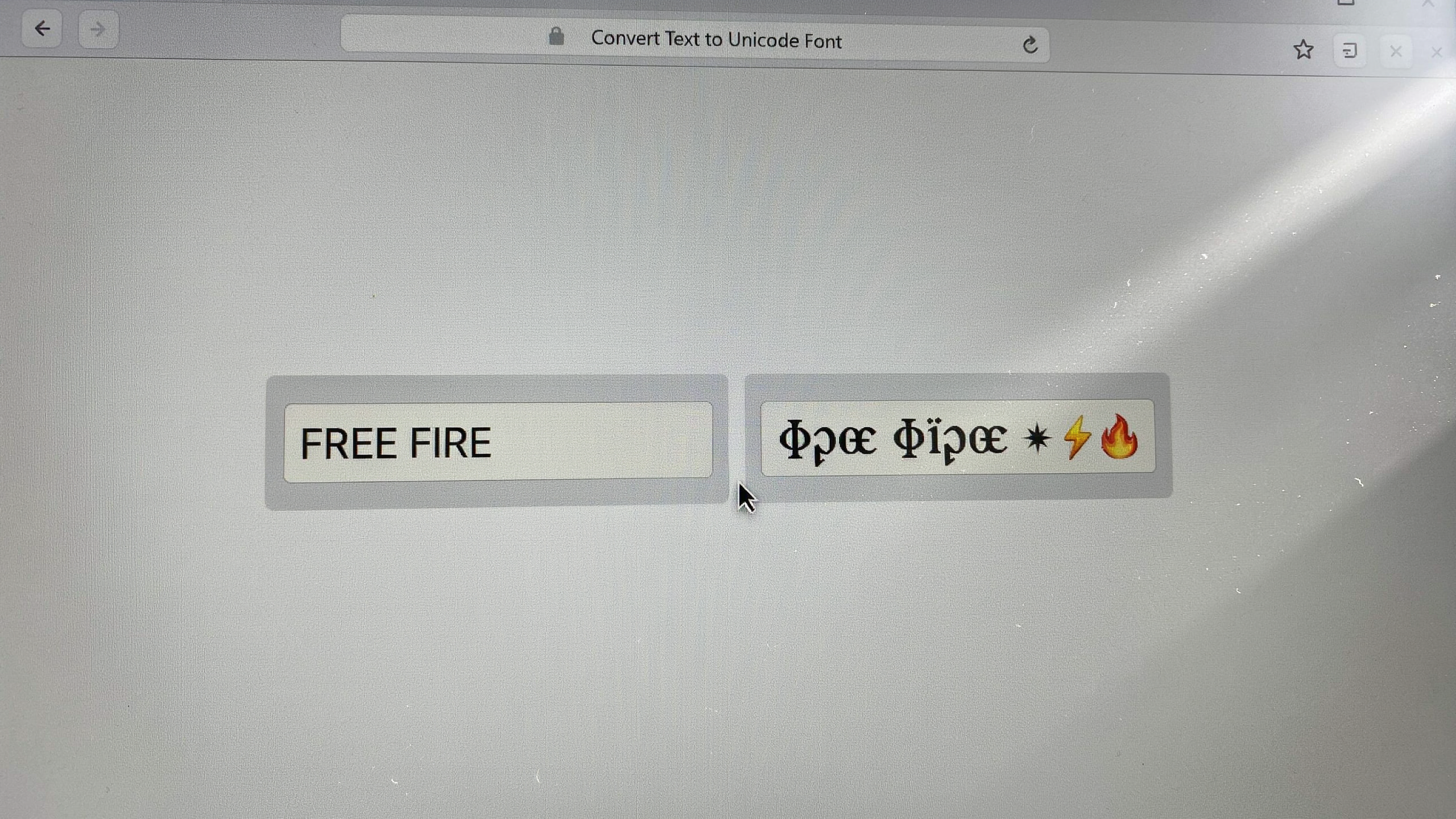
When I first started customizing my Free Fire name, I assumed a font generator was doing something magical like embedding a new typeface into the game. The reality is simpler and smarter. A font generator maps each standard letter you type to a visually similar character from the Unicode standard. That's the global system that assigns a unique code to every symbol across all writing systems. Instead of sending the letter "A" to Free Fire, the tool sends a mathematical bold "𝐀" or a script "𝒜" that already exists in Unicode. The game's text rendering engine sees a valid character, so it displays the styled version without any special fonts installed on your device.
This is why the output works everywhere from the name-change screen to the kill feed. Free Fire supports the Unicode ranges that include these fancy glyphs. That means a stylish name is not a hack or a mod. It is just a different set of characters that the game already knows how to draw. A good font generator handles the conversion instantly, letting you preview dozens of styles before you copy the result. The tool does not create new fonts. It selects from thousands of pre-existing Unicode symbols that most players never type because they are not on a standard keyboard.
One practical detail matters for Free Fire specifically: not every Unicode glyph renders correctly in the game's chat and profile. Some characters appear as empty squares or question marks on certain devices. A reliable font generator filters out unsupported symbols and only offers styles that display consistently across Android, iOS, and emulators. That filtering is the difference between a name that looks clean in the lobby and one that breaks when your squad tries to tag you. When you paste the converted text into Free Fire, the game stores the raw Unicode codes. Your name stays styled permanently until you change it again.
Understanding this behind-the-scenes process also explains why some fonts work in Free Fire but not in other games or apps. Each platform has its own Unicode support range. A font generator built for Free Fire tests its output against the game's known character set. That's why I recommend using a tool that specializes in gaming names rather than a generic text styler. The next time you see a player with a bold or cursive name, remember: it is not a secret font file. It is just Unicode doing the heavy lifting, and a font generator made the swap effortless.
Step-by-Step: Using a Font Generator for Your Free Fire Name
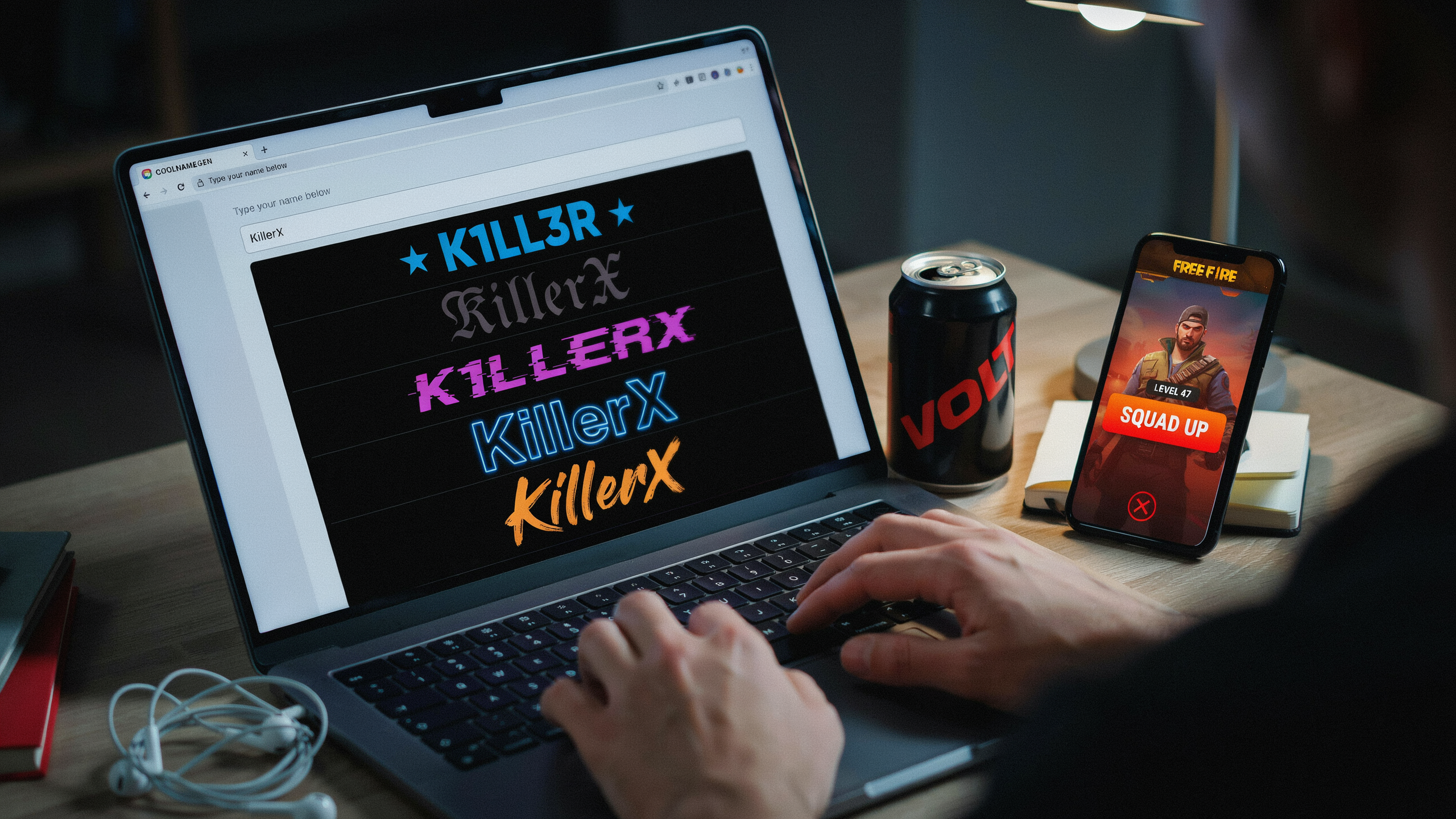
I remember the first time I tried to change my Free Fire name with a fancy style. I typed the same word into a dozen different boxes, copied the wrong result twice, and ended up with a name that looked like a glitch. The process is actually simple once you know the order. Here is the exact workflow I use now, and it takes less than two minutes.
- Open the ff name generator page. I keep it bookmarked on my phone because Free Fire is a mobile game and I usually rename between matches. The page loads fast even on a weak connection, which matters when you are in a lobby with friends waiting.
- Type your base name into the input box. Use the name you actually want, not a placeholder. The tool works best when you start with the real spelling because the styled output keeps the same letters. If your name has numbers, type those too. Free Fire allows numbers in names, and most font styles support them.
- Scroll through the style previews. You will see your name rendered in dozens of fonts at once, so you can compare how the letter shapes look. I usually stop at the ones with clean curves because overly ornate styles become hard to read on the kill feed. Tap or click the style you like, and the tool copies the styled text to your clipboard automatically. Some versions show a small copy button next to each style, which is even faster.
- Paste the result into a plain text field first. I open a note app or a chat box and paste there before going to Free Fire. This catches any invisible characters or spacing issues. If the pasted text looks correct in the note, it will look correct in the game. If it shows boxes or question marks, pick a different style from the same tool.
- Open Free Fire and go to your profile. Tap your current name, then tap the edit icon. The game opens a rename dialog with a text field. Long-press the field and choose paste. The styled name should appear exactly as it did in your note app. Free Fire charges diamonds for a name change, so double-check the spelling and style before you confirm. Once you hit save, the new name goes live immediately, and your squad will see it in the next match.
The whole flow works because a font generator converts your plain text into Unicode characters that look like a different font but are still accepted by the game's name field. I have used this method on Android and iOS without any issues, and the same steps work for clan names when you are setting up a new squad.
Best Font Styles for Free Fire Names
After testing dozens of styles across Free Fire's UI, I have found that not every font style survives the game's rendering engine. The best choices are those that stay readable in the kill feed, the squad list, and the end-of-match screen. Here are the styles I recommend most often, with examples pulled straight from a reliable ff name generator.
Bold styles work best for players who want their name to pop in the lobby. A bold font like 𝐁𝐨𝐥𝐝 𝐍𝐚𝐦𝐞 adds weight without sacrificing clarity, and it holds up well on smaller mobile screens. I use bold for my main account because it is the easiest to read at a glance during a hot drop.
Italic styles give a sense of motion, which fits the fast pace of Free Fire. A name like 𝐼𝑡𝑎𝑙𝑖𝑐 𝑆𝑡𝑦𝑙𝑒 looks sharp in the kill feed, but I avoid heavy italics for clan tags because they can blur on low-end Android devices.
Cursive and script styles are the most requested, but they are also the riskiest. A cursive name like 𝒞𝓊𝓇𝓈𝒾𝓋𝑒 𝒩𝒶𝓂𝑒 looks elegant in the profile screen, yet some characters fail to render in the in-game chat. I recommend testing a cursive style in a practice match before committing to it for ranked play.
Gothic styles are my personal favorite for aggressive players. The sharp, angular letters of a gothic font like 𝔊𝔬𝔱𝔥𝔦𝔠 𝔑𝔞𝔪𝔢 project intimidation, and they remain legible even in the heat of battle. Pair a gothic font with a short name for maximum impact.
Small caps offer a clean, professional look that suits squad leaders and clan founders. A name like Sᴍᴀʟʟ Cᴀᴘs Nᴀᴍᴇ reads as deliberate and organized, which helps when you are coordinating with teammates.
Symbol styles are where a font ff tool really shines. Adding symbols like ★, ☠, or ✿ around your name creates a unique identity, but I cap it at two symbols per name. Too many symbols clutter the UI and make your name hard to target in the squad list.
For clan leaders, I always recommend pairing a bold or gothic style with a clan name generator to keep the whole squad visually consistent. A unified style makes your clan instantly recognizable in the lobby, and it saves time when recruiting new members.
Adding Symbols and Special Characters to Your Name
Once you have a stylish base from a font generator, symbols and special characters are what make it truly yours. I like to think of the generated font as the skeleton and the symbols as the personality. A simple name like "Raven" becomes "꧁༺Raven༻꧂" or "Rᴀᴠᴇɴ⚡" with just a few extra touches. The trick is restraint: one or two well-placed symbols read as intentional, while a wall of crowns and swords makes your name hard to read in the kill feed.
Most Free Fire players pull symbols from a few reliable places. The in-game keyboard on Android and iOS has a dedicated symbol row, but the real gems live in Unicode blocks that a standard keyboard never shows. I keep a small collection of favorites: ꧁ ꧂ for framing, ༺ ༻ for a sharper frame, and single characters like ✦, ☬, 々, and 亗 that add texture without taking up much space. Emojis work too, but they render differently across devices, so I prefer Unicode symbols that look the same on every phone.
When I combine a generated font with symbols, I follow a simple order: start with the name in the font you chose, then wrap it with a frame, then add one accent character at the start or end. For example, if the font generator gives you "Shadow", you might end up with "꧁Shadow꧂⚡". That reads cleanly in the lobby and in battle. If you want to experiment with more aggressive combinations, the font ff page on our site lets you preview how different symbols sit next to the generated letters before you commit.
One warning from experience: Free Fire has a character limit for names, and symbols count toward it just like letters. A long generated font plus a heavy frame can push you over the limit, so test the full string in the game's rename screen before spending diamonds. Also avoid symbols that look like letters in another language, because those names can get flagged. Stick to decorative marks and you will stay safe.
Font Generator Compatibility: Android, iOS, and PC
I have tested a font generator on all three platforms, and the good news is that the core experience stays nearly identical. The tool runs in a browser, so it does not care whether you are on a Samsung phone, an iPhone, or a Windows laptop. You type your name, pick a style, and copy the result. The difference shows up in how each device handles the copied text.
On Android, copying from a font generator is straightforward. Long-press the styled text, tap Copy, then open Free Fire and paste it into the name field. Most Android keyboards also let you paste directly from the clipboard tray. I have noticed that some older Android versions strip certain Unicode symbols, so if your name looks broken, try a simpler style from the same font generator.
iOS behaves almost identically, but with one quirk. When you copy fancy text from Safari or Chrome, iOS sometimes converts it to plain text if the font uses very rare Unicode blocks. To avoid this, I paste the copied name into the Notes app first, then copy it again from there. That second copy usually preserves the styling when you paste it into Free Fire.
On PC, a font generator is easiest to use because you can see the full character set clearly. Copy with Ctrl+C, then paste into Free Fire with Ctrl+V. The PC version of Free Fire accepts the same Unicode characters as mobile, so there is no advantage or disadvantage there. The main benefit is speed: you can test ten styles in the time it takes to test three on a phone.
One Free Fire-specific restriction applies everywhere. The game limits player names to 12 characters, and some fancy fonts count each styled letter as multiple characters because of the underlying Unicode. If your name exceeds the limit, the font generator output will be rejected. I always check the character count before copying, and I keep a backup plain-text name ready in case the styled version fails.
For the smoothest experience, I recommend using the same font generator on every device. The ff name generator on our site has been tested across Android, iOS, and PC, and it produces consistent output everywhere. That consistency matters when you switch between your phone and an emulator, because a name that works on one device should work on all of them.
Common Problems and How to Fix Them
I have lost count of the times a stylish name looked perfect in the preview, only to break the moment I pasted it into Free Fire. Most issues come down to three things: unsupported characters, invisible spaces, or a name that is simply too long. The good news is that almost every problem has a quick fix, and I will walk you through the ones I see most often.
Invisible characters or blank spaces in your name
Some font generators insert zero-width or non-breaking spaces to make a name look centered or spaced out. Free Fire often strips these characters, which can leave your name looking empty or cause the game to reject it entirely. If your name shows up blank in the lobby, remove any special spacing characters and stick to visible symbols like stars, hearts, or arrows. A clean ff name generator will show you exactly which characters are safe before you copy them.
Name rejected when you try to save it
Free Fire has strict rules about what counts as a valid name. If you get an error, check for banned words, unsupported Unicode blocks, or a name that exceeds 12 characters. I recommend testing your styled name in a notes app first, then pasting only the plain text version into the game. Sometimes the problem is not the style but a hidden character that the game cannot read.
Font not displaying in-game
You chose a fancy style, but your name shows up as plain text or as boxes. That usually means the font relies on Unicode characters that Free Fire does not render on your device. The fix is to use a font generator that sticks to widely supported symbols and letters. If you are on an older Android phone, try a simpler style with fewer decorative glyphs. A font ff style that works on one device may not work on another, so always test in a custom room before committing.
Character limit problems
Free Fire caps names at 12 characters, and some fancy styles count each symbol separately. If your styled name is too long, shorten the base text or replace a multi-character symbol with a single glyph. I keep a list of short, high-impact symbols like ★, ☠, and ꧁ that add style without eating your character budget.
Creating a Stylish Clan Name with a Font Generator
Clan names carry the same identity weight as your player name, and a font generator makes them just as easy to style. I use the same tool for both, because the core mechanics don't change: type the base name, pick a style, copy the output, and paste it into the clan creation screen. The difference is that clan names often need to read clearly at a glance, since teammates and rivals see them in the lobby, on the leaderboard, and in the kill feed. A heavily decorated clan name can look impressive, but it can also become unreadable when the font is too ornate.
For clan names, I lean toward bold or outlined styles that stay legible in small text. A font generator gives you dozens of options, so I test two or three candidates side by side before committing. The best approach is to keep the clan tag short and punchy, while the full clan name can carry more visual flair. If your clan uses a symbol or a special character in its tag, the generator can often add matching symbols to the name itself, which ties the whole identity together.
One thing I've learned from running a clan is that consistency matters. When every member uses the same styled font from a clan name generator, the group looks more organized and intimidating in match lobbies. You can share the exact style settings with your squad, so everyone pastes the same format. This also helps with recruitment, because a polished clan name signals that the group takes itself seriously. Just remember to check the character limit on clan names, which is slightly different from player names, and avoid styles that break the game's text rendering.
Free Fire Name Rules You Should Know
Before you commit to a stylish new identity, it helps to know what Garena actually allows. Free Fire names can be up to 12 characters long, and that count includes spaces, symbols, and letters. If you use a ff name generator to build a name, double-check the final character count before you hit save, because the game will silently trim anything over the limit.
Special characters are where most players get tripped up. Free Fire supports a limited set of symbols, mostly basic punctuation and a few Unicode glyphs. Fancy fonts from a font ff tool often use Unicode characters that look like letters but are technically different symbols. Some of these are allowed, but many are blocked by the game's profanity and impersonation filters. If your name contains a banned character, the game may reset it to a default string like "Player123456" without warning.
There is also a cooldown on name changes. You can change your name for free once, but after that each change costs diamonds. The exact price varies by region, and you may need to wait a few days between changes. If your name gets reset by the system, you usually get one free rename as compensation, but that is not guaranteed.
One more rule that catches people off guard: you cannot use a name that impersonates a Garena employee, a pro player, or a well-known streamer. The filter is aggressive, and even a slightly altered version of a famous name can trigger a reset. When you use a clan name generator for your squad tag, keep it under four characters and avoid symbols that look like letters, because clan tags have their own stricter filter.
Frequently Asked Questions
Is a font generator safe to use for Free Fire?
Yes, a reputable font generator is safe because it only converts text into Unicode characters that Free Fire already supports. It never asks for your game password or login details. I stick to browser-based tools that work instantly and avoid any site that requests account access or app installation.
Why does my stylish name show as blank boxes or question marks?
That happens when the generated characters aren't supported by the device or the game's font library. Some fancy Unicode symbols render perfectly on Android but break on iOS, or vice versa. I always test a name in the game's rename field before confirming, and I keep a plain-text backup ready.
Can I change my Free Fire name more than once?
Yes, but each rename costs diamonds or a rename card, and Free Fire limits how often you can change it within a set period. If the first stylish name breaks, you'll need to spend again. I recommend testing the exact text in a notes app and on a second device before spending currency.
Do font generator names work in clan tags and guild names?
Mostly yes, but clan tags have stricter character limits and often reject symbols that work in player names. I've seen stylish clan tags fail because the game strips special characters from tag fields. Test the tag separately, and keep it under eight characters for the best compatibility.
Will using a fancy name get me banned?
No, using a font generator itself won't get you banned because the output is standard Unicode text, not a hack or mod. However, names that impersonate admins or include offensive symbols can trigger reports. I always keep the style clean and avoid characters that look like official game icons.